
The analyst and AI
The analyst answers questions about your models: what a metric means, how it is calculated, where it comes from, and what the number is. It is an AI model (Claude, by Anthropic).
Three switches, all off at first
Section titled “Three switches, all off at first”| Switch | Where | Who | What it allows |
|---|---|---|---|
| AI-enabled | Organisation, Edit organisation | Owner | The definitions of your models go to Anthropic. With a Power BI model, so do the results of the questions you ask. |
| Analyst may query | On a database connection’s card | Owner of the connection | The analyst runs read-only queries on that database and sends the rows to Anthropic. It skips columns with personal data. |
| Allow queries through the API | Organisation, Edit organisation | Admin | Applications with an API key may have KPIs computed. See For applications. |
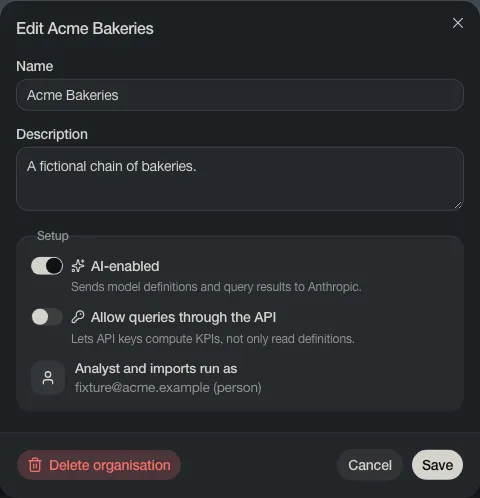
With AI off, everything else works: reading models, lineage, search and KPIs.
The AI key
Section titled “The AI key”AI needs a key from Anthropic. Your deployment may have one for everybody. To use and pay with your own, open Organisation, find AI key and choose Add key. The key is stored encrypted; nobody can view it again.

Open the analyst with the speech bubble at the top right. It knows which organisation, model or metric you are looking at.
The analyst reads numbers with your login. You never get numbers from it that you could not see in Power BI yourself.
When the analyst assumes something
Section titled “When the analyst assumes something”If your question leaves something open, the analyst picks the likeliest meaning, answers, and says what it assumed.
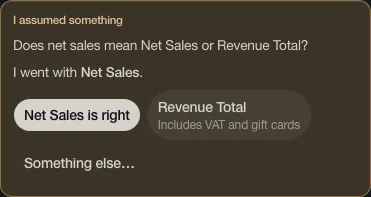
Confirm it or pick another. Your answer is saved as a draft on the KPI, so the next person gets the same meaning. Open questions are collected on Ontology, Open questions.
The analyst can be wrong. Check numbers before you share them.