
Azure SQL
An Azure SQL connection does two things. It lets the lineage of a Power BI model run on through the database’s views, down to the base tables. And it can be read as a model of its own.
Before you start
Section titled “Before you start”- The Owner role in Depositori.
- The server and database name. When a Power BI model reads the database, Depositori knows both already.
- A way to sign in. Either your Microsoft account, with the right to see definitions in the database
(
VIEW DEFINITION); or a read-only database login, which you store in Depositori.
Depositori reads table and view definitions. It does not read rows.
Add the connection
Section titled “Add the connection”When a model reads the database, open Connections and choose 1 suggested next to Add connection. The form is filled in; give it a name and choose Add connection.
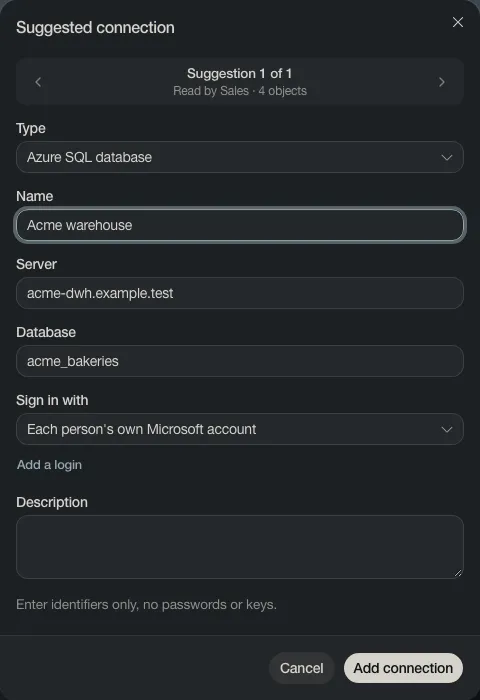
Otherwise choose Add connection, set Type to Azure SQL database and fill in Server and Database.
Use it
Section titled “Use it”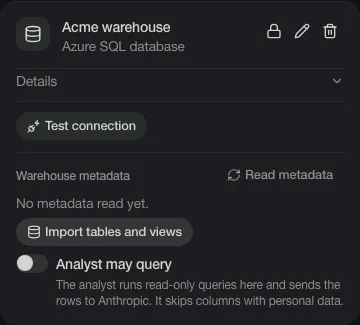
- Test connection checks that the database can be reached.
- Read metadata reads the views the models use, so the lineage runs through them.
- Import tables and views makes a model of the database’s own tables. Pick the schemas, then Import.
- Analyst may query is off. Read The analyst and AI before you turn it on.