
For applications
People read Depositori in the browser. Software reads the same definitions in two ways. Both are on the Organisation page.
Connect an AI agent (MCP)
Section titled “Connect an AI agent (MCP)”For Claude, ChatGPT or another AI agent that you use yourself.
- Open Organisation and find Connect an AI agent.
- Copy the address and add it in your agent as a connector. The steps for Claude, ChatGPT and Claude Code are under the address.
- The agent asks you to sign in to Depositori once. After that it reads your organisation as you, with your role.
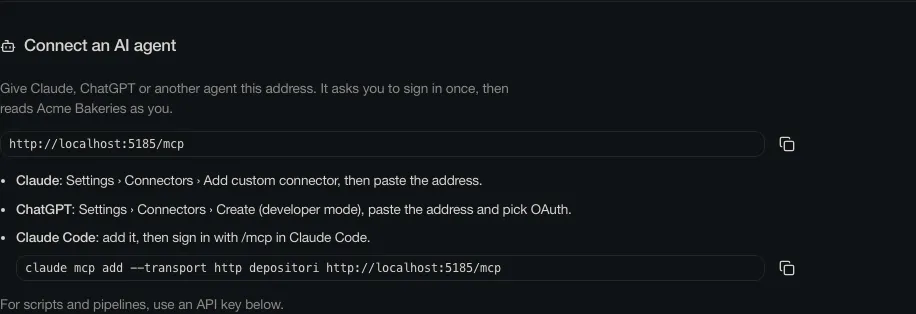
Nothing to paste besides the address, and no key to keep safe. You see and disconnect your agents under your name at the bottom left, Connected apps.
API keys
Section titled “API keys”For scripts, pipelines and applications that run without a person. You need the Owner role.
- Open Organisation and find API keys.
- Choose Create key, name it after the application that will use it, and choose Create.
- Copy the key now. You will not see it again.
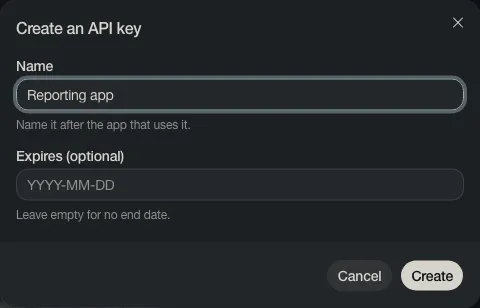
A key reads one organisation, as a Reader. Revoke stops it at once.
By default a key reads definitions only. For an application to have KPIs computed, an Admin turns on Allow queries through the API under Edit organisation.
Your developers find the technical description at /api/v1/openapi.json on your Depositori’s address.